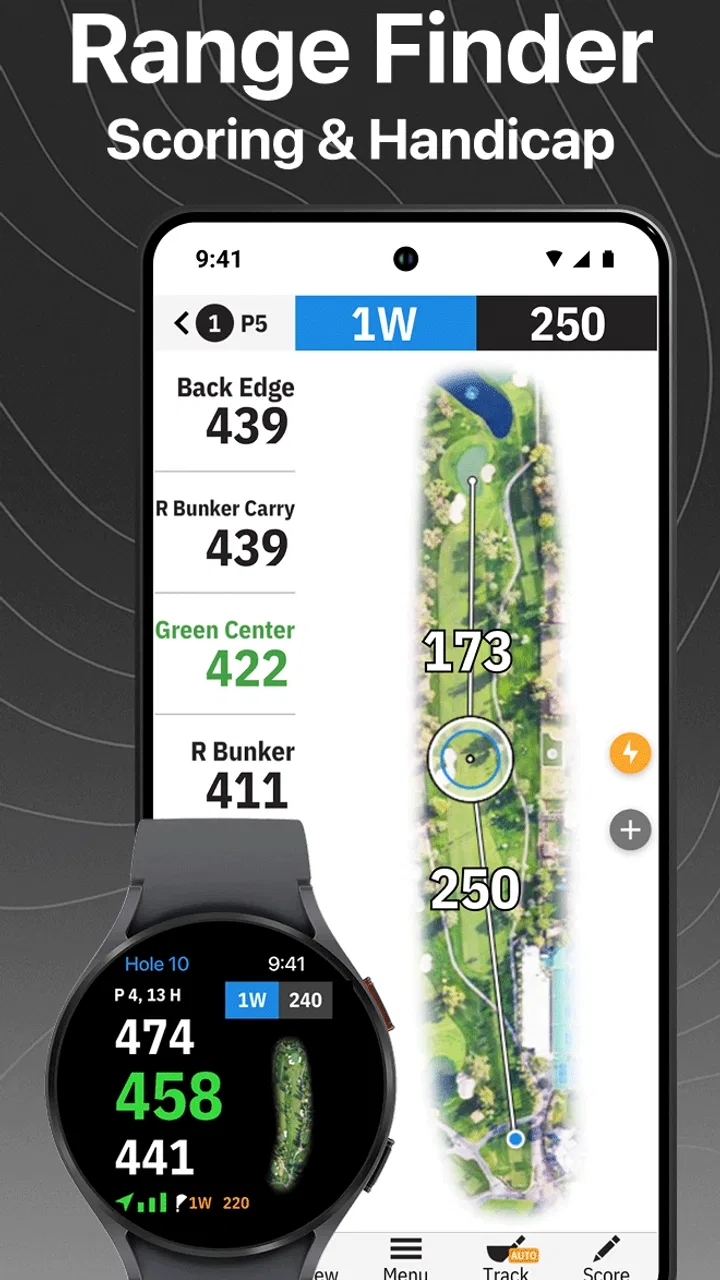
Golfshot Golf GPS RangeFinder
- 4.4
- Rating
- 1.00M
- Installs
- Free
- Price

 Analysis by App-foxy
I judge golf apps by what happens between arriving at the first tee and signing the card, not by how impressive the feature list sounds. Golfshot Golf GPS RangeFinder is built for that practical stretch of a round: checking yardages, recording shots, keeping score, and looking back at statistics without carrying a separate rangefinder, notebook, and calculator. Golf Genius Mobile has kept it in the sports category for years, and that long presence shows in the app’s focus. It is less about turning golf into a game and more about reducing small decisions on the course.
I found the best experience came from treating it as a repeatable routine rather than opening every tool on every hole. Before playing, I would prepare the round, confirm the settings that mattered to me, and then use the same sequence after each shot. That approach made the app feel calm and useful. If I tried to explore everything while standing on a tee box with a group waiting behind me, the benefits were much less obvious.
How Golfshot fits into a normal round
The basic workflow is easy to understand. I use the GPS view to orient myself, check the distance I need, track shots when I want more detail, and enter the score before moving on. That combination is the reason to choose this app over a simple digital scorecard. It connects what I do during the hole with the information I may want to review later.
You May Also Like

 Blood Strike: 2.5 Anniversary
Blood Strike’s Loadouts Turn Every Drop Into a Tactical Gamble
A close look at Blood Strike’s custom loadouts: how fast access to signature weapons reshapes its battle royale rhythm, rewards preparation, and narrows the gap between fights.

 Pandora - Music & Podcasts
Pandora’s Music Is Easy to Start, but Harder to Recover
Pandora’s strength is its low-effort path from a seed to a station. Its weak spot is how much confidence it asks you to place in connection, setup, and quiet recovery.

 8 Ball Pool
 Is Built on Rivalries, Rematches, and Routine
A close look at the rivalries, rematches, shared routines, and unanswered safety questions that turn a quick pool match into a persistent mobile community.

 Samsung Music
’s Quiet Strength Is Playing What You Already Own
Its reach comes less from spectacle than from dependable access to a personal library. That simplicity is both the app’s strongest retention engine and its ceiling.

 AccuWeather: Weather Radar
AccuWeather Review: A Quick, Clear Forecast for Everyday Decisions
For everyday plans, the best forecast is the one you can understand quickly. AccuWeather makes rain timing, radar, and local conditions easy to act on, with a few trade-offs.

 Hill Climb Racing
Why Hill Climb Racing Still Turns Crashes Into One More Run
A tiny car, a bumpy hill and one more upgrade: Hill Climb Racing keeps resurfacing because its simple chaos makes every near-miss feel personal.
More From Our News Desk



For a casual round, I would not record every detail automatically. The most efficient habit is to decide in advance what I am actually trying to learn. If my goal is better club selection, I focus on shot tracking and keep the score entry quick. If I am playing socially, I may use the GPS yardage and scoring tools while leaving deeper statistics for another day. This prevents the phone from becoming another distraction.
The GPS view is most helpful when I use it as a planning aid rather than as an unquestionable answer. A yardage can tell me the distance I need to cover, but it cannot choose a safe target, account for a poor lie, or replace the judgment required around hazards and changing conditions. I still compare the displayed information with what I can see, especially when the hole has a blind landing area or when the pin position makes the approach more demanding.
Shot tracking adds a different kind of value. A single round can feel memorable for the wrong reasons, and it is easy to blame putting, driving, or approach play without checking the pattern. Recording shots gives me a more disciplined way to examine where strokes are really being lost. The trade-off is attention: every entry takes a moment, so the feature works best when I use it consistently and simply.
Scoring is the part I would recommend to almost every golfer, even someone who is not interested in statistics. Entering the result hole by hole reduces the chance of reconstructing the round from memory later. It also keeps the app useful when I am playing with friends who do not want a complicated analysis session. The scorecard remains the center of the experience, while the other tools can be added according to the round.
The first-tee routine that saves time
My preferred routine begins before the opening tee shot. I make sure the phone is ready, choose the correct course and round setup, and check that the display is comfortable to read outdoors. I do not wait until the group is ready to discover that I need to change a preference or correct an entry. A minute of preparation is worth more than repeatedly stopping during play.
Once the round starts, I use the same order every time: check the hole, decide whether I need a target yardage, play the shot, and enter the result at a natural pause. That pause might be while walking toward the next position or after everyone has played. The important point is that I avoid handling the phone while making a decision over the ball. Golfshot works best when it supports the rhythm of golf instead of competing with it.
A realistic example is a weekend round with three friends. I might open the hole view while walking from the cart, use the GPS information to choose a conservative target, and then record the shot only after the group has moved on. On the green, I enter the score once rather than trying to document every putt in the middle of the group’s routine. At the end, I have a usable record without making the round feel like an administrative task.
What the app is really good at
The strongest combination is the relationship between distance information and later review. A standalone rangefinder may be faster for a golfer who wants one number and nothing else. A paper card may be more comfortable for someone who dislikes phones on the course. Golfshot earns its place by joining those jobs together and adding a path toward statistics.
I also like that the app can serve different levels of commitment. A beginner can use it as a scorecard with helpful yardages, while an experienced player can build a more deliberate tracking habit. That flexibility matters because not every round has the same purpose. Practice, competition, a quick nine holes, and a relaxed social game all demand different amounts of information.
The app has an average rating of 4.5 from around 16 thousand ratings, with roughly 1.2 thousand written reviews. It has passed a million installs, which fits my impression that it is aimed at a broad golfing audience rather than a narrow group of data enthusiasts. It is free to install, rated for Everyone, and includes in-app purchases ranging from $1.99 to $59.99 per item. I would therefore start with the free experience and decide only after understanding whether the workflow fits my habits.
Settings and habits that make the experience smoother
The most important settings are not necessarily the most exciting ones. I would first check the measurement preferences, scoring choices, and any options that affect how much information appears during a round. The goal is to make the screen answer the question I usually ask on the course. A crowded view can slow me down, while an overly simple one may force extra taps.
I would also review the way shot tracking is used before committing to a full round. Tracking every shot sounds useful, but it creates a burden if I forget entries or record them inconsistently. A better starting point is to choose one category to follow for several rounds, such as tee shots or approaches. Once that habit feels automatic, I can expand it. This produces cleaner personal information than attempting a complete record once and abandoning it.
Screen readability deserves attention because golf is played in changing light. I prefer to prepare the display before leaving the clubhouse rather than adjusting it while standing on a tee. Small practical choices, such as keeping the phone accessible and using the same hand or pocket, can make the difference between a quick glance and a frustrating pause.
Notifications and phone interruptions are another consideration. I do not want unrelated messages pulling my attention away from a shot or causing me to handle the device more than necessary. The app is a tool for the round, so I use it with the phone’s broader distractions under control. This is not a special Golfshot feature; it is simply the discipline needed to make any phone-based golf assistant useful.
Use the app in layers instead of all at once
I recommend a three-layer setup. The first layer is scoring, because it gives every round a reliable record. The second is GPS planning, used when I need help choosing a target. The third is shot tracking and statistics, reserved for rounds where I am willing to be consistent. This order keeps the essential function dependable even when I am tired, playing quickly, or more interested in conversation than analysis.
That layered method is one of the less obvious advantages of the app. Many golfers assume they must either track everything or use nothing. In practice, the tools can support separate goals. A golfer working on course management may use yardages and scores but skip detailed shot records. Someone preparing for a tournament may accept the extra effort because the later review matters more than speed.
I would also create a personal rule for uncertain entries. If I cannot remember exactly what happened, I would rather leave the record simple than invent precision. Statistics are only helpful when the underlying routine is repeatable. A neat-looking history built from guesses can lead to worse decisions than a smaller, honest sample.
Faster patterns for busy rounds
The fastest pattern is to make decisions before the final moment. While approaching the hole, I look at the layout and identify the likely target. Then, when it is my turn, I check the relevant yardage instead of opening the app without a question in mind. This reduces browsing and keeps the phone interaction short.
For scoring, I enter results at the same point on every hole. Some golfers will prefer doing it near the green, while others will find the walk to the next tee more natural. Consistency matters more than the exact location. If I wait until several holes have passed, I am more likely to confuse scores or forget a detail.
For shot tracking, I use a small set of repeatable labels and avoid turning every miss into a long explanation. The value comes from seeing patterns across rounds, not from writing a diary after every swing. This is especially important for players who already lose focus when they overanalyze a bad shot.
Another useful habit is separating course navigation from post-round reflection. During play, I want a quick answer: where is my target and what score should I record? Afterward, I can spend more time examining statistics. Mixing those two modes on every hole makes the round slower and can encourage decisions based on incomplete emotions.
Where it may not replace dedicated equipment
Golfshot is not automatically better than a dedicated rangefinder. A golfer who wants a single distance with almost no interaction may prefer a physical device. A phone can also be less comfortable in wet weather, bright sunlight, or a cart where it is not immediately accessible. Players who compete under rules or personal routines that limit phone use should consider that before building their whole process around the app.
It is also not the ideal choice for someone who dislikes recording information. The scoring feature is easy to justify, but detailed statistics require repeated effort over time. If I know I will stop tracking after two holes, I would use the app mainly for GPS and scoring rather than paying for a richer plan in the hope that motivation appears later.
Likewise, golfers who want highly specialized swing analysis may need a different type of product. Golfshot’s appeal is the on-course combination of yardages, shots, scores, and statistics. It should not be selected as though it were a dedicated launch monitor, coaching platform, or replacement for lessons. Its useful territory is course management and round records.
Limits, costs, and who should choose it
The free starting point is helpful because it lets me test the basic rhythm before making a financial commitment. The presence of in-app purchases means that some golfers will eventually encounter a choice between staying with the available experience and paying for additional functionality. I would make that decision based on actual use, not on the assumption that more data will automatically improve my scores.
The current version is 2.11.15 and the app requires an operating system version of 10 or later. That makes compatibility worth checking before a round, especially if the phone is older or has not been updated in a while. I would not wait until the morning of a trip to discover that the device needs attention.
There is also a mental limit to consider. GPS yardages can encourage false confidence if I treat them as exact instructions. The app can support a better plan, but the plan still depends on lie, wind, elevation, hazards, and the shot I can realistically execute. I found it most valuable when it reduced guesswork without pretending to remove judgment.
The app is a strong fit for golfers who play often enough to notice patterns, want one place for score and course information, and are willing to develop a consistent routine. It is particularly useful for someone moving beyond a paper card but not ready for a collection of separate golf devices. It is less suitable for a golfer who wants zero phone interaction, a highly specialized coaching system, or the absolute quickest possible distance reading.
One trade-off deserves emphasis: the more faithfully I track, the more useful the statistics become, but the more the phone can intrude on the round. I would rather collect a smaller amount of reliable information than chase a complete record that makes golf feel like data entry. That is the central discipline required by this app.
My verdict after building a repeatable routine
I see Golfshot as a practical bridge between a traditional scorecard and a more deliberate approach to course management. Its value is not one spectacular feature. It comes from combining GPS yardages, shot tracking, scoring, and statistics in a workflow that can be made as light or as detailed as the round requires.
My advice is to begin with scoring and occasional yardage checks, then add shot tracking only after the basic routine feels natural. Prepare the settings before the first tee, use the same entry point on every hole, and decide what question you want the statistics to answer. Those habits reveal whether the app is genuinely helping you or merely adding another screen to your golf.
For me, the best use case is a golfer who wants to understand decisions over several rounds: whether misses come from ambitious targets, poor club choices, or inconsistent execution. The app cannot solve those problems by itself, but it can make them easier to see. That is more valuable than a feature list when the information is collected honestly.
My final recommendation is to try it as a focused golf companion, not as a substitute for judgment or practice. Start free, keep the on-course routine short, and judge the paid options only after you know which tools you actually use. If that balance suits you, Golfshot can become a dependable part of your round. If you want a completely hands-free experience or a dedicated technical training system, a traditional rangefinder or specialist golf tool may be the better choice.
Golf Genius Mobile has made an app that works best when the golfer sets the pace. Used with restraint, it gives me useful yardage support and a clearer record of each round. Used without a plan, it can create friction and distract from the game. That distinction is why I recommend it to organized, curious golfers, while advising everyone else to test the simplest workflow first.
FAQs for Golfshot Golf GPS RangeFinder
01What features does Golfshot Golf GPS RangeFinder offer?
Golfshot Golf GPS RangeFinder provides detailed GPS distances to the green, hazards, and targets on over 45,000 courses worldwide. It includes augmented reality views, real-time distances, and 3D flyover previews. Additionally, it offers score tracking, statistics, detailed course reviews, and personalized club recommendations.
02Is Golfshot compatible with my device?
Golfshot is available for both Android and iOS devices. It requires Android 6.0 or later and iOS 12.0 or later. Ensure your device has GPS capabilities for accurate readings. Compatibility with Apple Watch and Wear OS devices is also available, providing seamless integration and real-time updates.
03Does Golfshot require a subscription for full access?
While Golfshot offers a free version with basic features, a subscription to Golfshot Pro unlocks advanced features like club recommendations, enhanced statistics, and augmented reality. The annual subscription includes regular updates and exclusive access to new features, providing a comprehensive golfing experience.
04How accurate is the GPS functionality in Golfshot?
Golfshot is known for its highly accurate GPS readings, providing precise yardages to the front, center, and back of the green. The app updates distances in real time, ensuring you have up-to-date information for every shot. User reviews consistently praise its reliability and precision on the course.
05Can I use Golfshot offline?
Yes, Golfshot allows you to download course maps for offline use. This is particularly useful when playing in areas with limited cellular coverage. While real-time GPS and some features require a data connection, most core functionalities remain available offline, ensuring uninterrupted gameplay.
Pros
- Accurate GPS mapping for precise shots.
- Detailed statistics to track progress.
- Integration with Apple Watch for convenience.
- User-friendly interface for easy navigation.
- Comprehensive course database worldwide.
Cons
- Battery consumption can be high during rounds.
- Requires internet for some features.
- Premium features behind a paywall.
- Occasional GPS signal issues in remote areas.
- Interface may lag on older devices.

Golfshot Golf GPS RangeFinder
Gallery